
A UPS Battery Backup Buying Guide explains how uninterruptible power supply systems protect electrical equipment from power disruptions and power quality issues. This guide outlines UPS system functions, component architecture, protection capabilities, capacity planning, battery technologies, and selection criteria. The purpose of a UPS battery backup buying guide is to support accurate purchasing decisions based on load requirements, runtime expectations, environmental conditions, and operational criticality.
An Uninterruptible Power Supply (UPS) is an electrical power protection system designed to provide instant backup power and power conditioning to connected equipment when the primary utility power source fails or becomes unstable. A UPS supplies stored electrical energy from an internal battery or battery system without interruption, ensuring the continuous operation of critical devices.
A UPS battery backup differs from generators because it delivers power immediately, with a transfer time of zero or near-zero, preventing shutdowns, data corruption, and hardware damage during power disturbances. UPS systems are commonly used to protect computers, servers, networking equipment, medical devices, industrial controls, and sensitive electronics.
A UPS battery backup system consists of several integrated components that work together to monitor incoming power, store energy, and deliver a stable output.
The battery is the energy storage component of a UPS system. It supplies direct current (DC) power during outages or voltage instability. Common battery technologies used in UPS systems include sealed lead-acid (SLA) batteries and lithium-ion batteries.
UPS batteries are designed for high discharge rates, predictable performance, and controlled recharge cycles. Battery capacity determines how long connected equipment can remain powered during a power failure.
The inverter converts stored DC power from the battery into alternating current (AC) power that matches the voltage and frequency requirements of connected equipment. Inverter quality directly affects output waveform stability, power efficiency, and compatibility with sensitive electronics.
High-quality inverters produce pure sine wave output, which is essential for servers, networking devices, and medical equipment.
The rectifier converts incoming AC utility power into DC power. This DC power is used to recharge the battery and, in some UPS designs, supply the inverter directly. Rectifier performance affects charging efficiency, battery lifespan, and overall UPS reliability.
In online UPS systems, the rectifier operates continuously, isolating connected equipment from utility power irregularities.
The static bypass provides an alternate electrical path that allows utility power to supply connected equipment directly if the UPS experiences an internal fault or overload. Static bypass systems enhance reliability by preventing total power loss during maintenance or component failure.
Static bypass circuits operate automatically and switch within milliseconds.
During normal operation, the UPS monitors incoming utility power for voltage level, frequency stability, and waveform quality. When the utility power fails or deviates outside acceptable limits, the UPS instantly switches to battery power.
The battery supplies DC power to the inverter, which converts it into regulated AC power for connected equipment. This transition occurs without interruption in online UPS systems and within milliseconds in standby or line-interactive systems. Once utility power returns to stable conditions, the UPS transfers the load back to utility power and recharges the battery.
A UPS battery backup is necessary to protect electronic equipment from operational disruption and damage caused by electrical anomalies. Modern electrical infrastructure experiences frequent disturbances beyond complete outages.
A UPS battery backup provides immediate electrical power during blackouts and unexpected outages. Power interruptions can occur due to grid failures, weather events, infrastructure maintenance, or internal electrical faults. A UPS prevents sudden shutdowns that disrupt operations and damage equipment.
Voltage instability, including overvoltage and undervoltage conditions, stresses electronic components. A UPS stabilizes incoming voltage through regulation and filtering, ensuring that connected equipment receives consistent electrical input.
Abrupt power loss can corrupt active files, databases, and operating systems. Storage devices and electronic components are particularly vulnerable during sudden shutdowns. A UPS provides sufficient runtime to save data, complete transactions, and initiate controlled system shutdowns.
For businesses, power interruptions translate into downtime, lost revenue, and productivity losses. A UPS supports operational continuity by maintaining power during short outages and bridging the gap until backup generators or utility power restoration occurs.
UPS battery backup systems address a range of electrical problems that originate from utility grids, internal wiring, or connected equipment. Each power disturbance affects equipment differently.
Blackouts are complete losses of utility power. A UPS supplies immediate backup power, maintaining continuous operation until power is restored or systems are safely shut down.
Brownouts involve sustained periods of reduced voltage. Low voltage conditions increase current draw and heat generation, leading to premature equipment failure. A UPS compensates by boosting the voltage to acceptable levels.
Voltage spikes are sudden increases in voltage caused by lightning strikes, grid switching, or large equipment cycling. UPS systems absorb and suppress these spikes, preventing damage to power supplies and circuit boards.
Electrical noise includes electromagnetic interference and radio-frequency interference that distorts power signals. Noise disrupts data transmission and sensitive electronics. UPS systems filter noise to provide clean power output.
Frequency deviations occur when power generation and load demand become unbalanced. Sensitive equipment requires a stable frequency to function correctly. Online UPS systems isolate output frequency from utility fluctuations entirely.
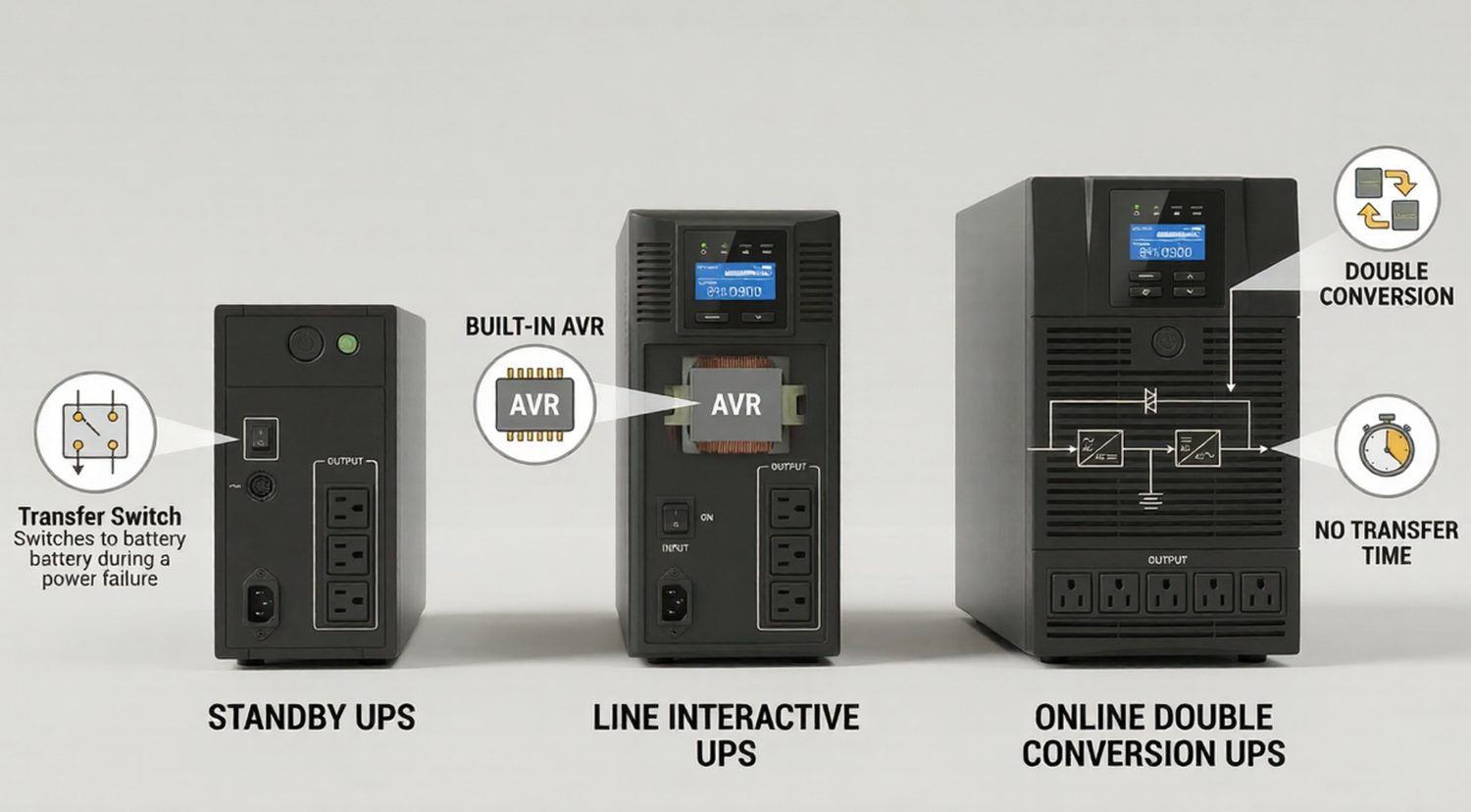
UPS systems are classified based on their power conversion topology and response characteristics. Each UPS type delivers a different balance of power quality, efficiency, and cost.
A standby UPS supplies power directly from the utility under normal conditions and switches to battery power when an outage occurs. This type offers basic protection and is commonly used for home electronics and non-critical equipment.
A line-interactive UPS includes automatic voltage regulation (AVR) to correct minor voltage fluctuations without switching to battery power. This design improves efficiency and extends battery life while providing enhanced protection for office and network environments.
An online double-conversion UPS continuously converts incoming AC power to DC and back to AC. This architecture provides complete electrical isolation from utility power problems and delivers zero transfer time during outages. Online UPS systems are used for mission-critical applications.
Single-phase UPS systems support lower power loads typical of homes, offices, and small server rooms.
Three-phase UPS systems handle higher power capacities and are used in data centers, industrial facilities, and large commercial environments.
UPS battery backup requirements vary by application environment, load sensitivity, and operational risk. A UPS selected for residential electronics differs significantly from a system designed for data centers or medical facilities. This section explains how UPS' design and feature priorities change based on use case.
Home electronics UPS systems protect devices such as computers, televisions, gaming consoles, and home networking equipment. These UPS units prioritize compact size, ease of use, and sufficient runtime for safe shutdown.
Home office UPS systems support workstations, monitors, routers, and VoIP devices. These systems focus on voltage regulation, battery runtime, and compatibility with modern power supplies.
UPS systems for networking and servers deliver pure sine wave output, extended runtime options, and remote management capabilities. These features ensure continuous data transmission and server availability.
Data center UPS systems provide high-capacity power protection, redundancy, scalability, and advanced monitoring. These systems integrate with generators and power distribution units to maintain uptime across entire facilities.
Industrial and medical UPS systems support sensitive machinery, diagnostic devices, and life-support equipment. These systems require strict voltage regulation, isolation, and compliance with safety standards.
Mission-critical UPS systems support environments where power loss poses safety, financial, or operational risks. Examples include emergency response systems, telecommunications infrastructure, and financial trading platforms. These UPS systems emphasize reliability, redundancy, and zero downtime.
UPS battery backup features determine protection level, runtime behavior, compatibility, and manageability. Feature selection directly influences system reliability and long-term performance.
Battery backup runtime refers to the amount of time a UPS can supply power to connected equipment after a utility power failure. Runtime is determined by battery capacity, connected load, and UPS efficiency. Short runtimes support controlled shutdowns, while longer runtimes maintain continuous operation for critical systems.
Runtime requirements vary by application, ranging from a few minutes for desktop computers to several hours for servers and industrial systems.
Automatic Voltage Regulation (AVR) stabilizes incoming voltage without switching to battery power. AVR corrects undervoltage and overvoltage conditions by boosting or trimming voltage levels. This function reduces battery usage, extends battery lifespan, and protects equipment from long-term voltage stress.
AVR is a core feature in line-interactive UPS systems.
UPS systems provide surge protection by absorbing high-voltage transients caused by lightning strikes, switching events, or electrical faults. Noise protection filters electromagnetic and radio-frequency interference that can disrupt sensitive electronics.
Together, these protections deliver clean, stable power output to connected equipment.
The output waveform defines the shape and quality of AC power delivered by the UPS. Waveform type affects compatibility with power supplies, motors, and sensitive electronic devices.
Simulated sine wave output approximates a sine wave using stepped voltage levels. This waveform is suitable for basic electronics, such as personal computers and home office equipment. Some active power factor corrected power supplies may operate less efficiently with simulated sine wave output.
Pure sine wave output replicates utility-grade power with a smooth and continuous waveform. This output type is required for servers, networking equipment, medical devices, and sensitive electronics. Pure sine wave output improves efficiency, reduces heat generation, and ensures compatibility with modern power supplies.
Transfer time is the duration required for a UPS to switch from utility power to battery power during an outage. Standby and line-interactive UPS systems have transfer times measured in milliseconds. Online double-conversion UPS systems provide zero transfer time by supplying power continuously from the inverter.
Shorter transfer times reduce the risk of equipment disruption.
UPS capacity planning ensures that connected equipment operates within safe electrical limits during normal and backup operation. Capacity requirements depend on electrical load characteristics and power factor behavior.
UPS capacity is expressed in volt-amperes (VA) and watts (W). VA represents apparent power, while watts represent real usable power. Equipment with a lower power factor consumes fewer watts relative to VA.
UPS selection must consider both VA and watt ratings to avoid overload conditions.
Total equipment load is calculated by summing the wattage of all connected devices. Manufacturer power ratings or measured load values provide accurate calculations. The UPS must support the combined load under peak operating conditions.
Accurate load calculation prevents overload and ensures stable operation.
Power factor measures how efficiently electrical power is converted into usable output. Modern UPS systems with high power factor ratings support more real power per VA. Selecting a UPS with appropriate power factor alignment ensures compatibility with energy-efficient equipment.
Load headroom refers to unused capacity reserved for future equipment additions. Industry practice recommends maintaining 20–30% headroom. Adequate headroom prevents premature UPS replacement and supports scalability.
Battery runtime defines how long a UPS can support connected loads during a power loss. Runtime requirements vary significantly by application criticality and outage duration. This section explains how runtime expectations influence battery selection and UPS configuration.
Short runtime supports safe system shutdowns and brief interruptions. Extended runtime maintains operation during prolonged outages. Runtime selection depends on operational priorities, data sensitivity, and backup power integration.
Many UPS systems support external battery packs to extend runtime without increasing UPS capacity. External batteries are used in server rooms, data centers, and industrial environments where extended power availability is required.
Critical loads require sufficient runtime to maintain safety, data integrity, and process continuity. Runtime planning must account for startup surges, load variation, and battery aging.
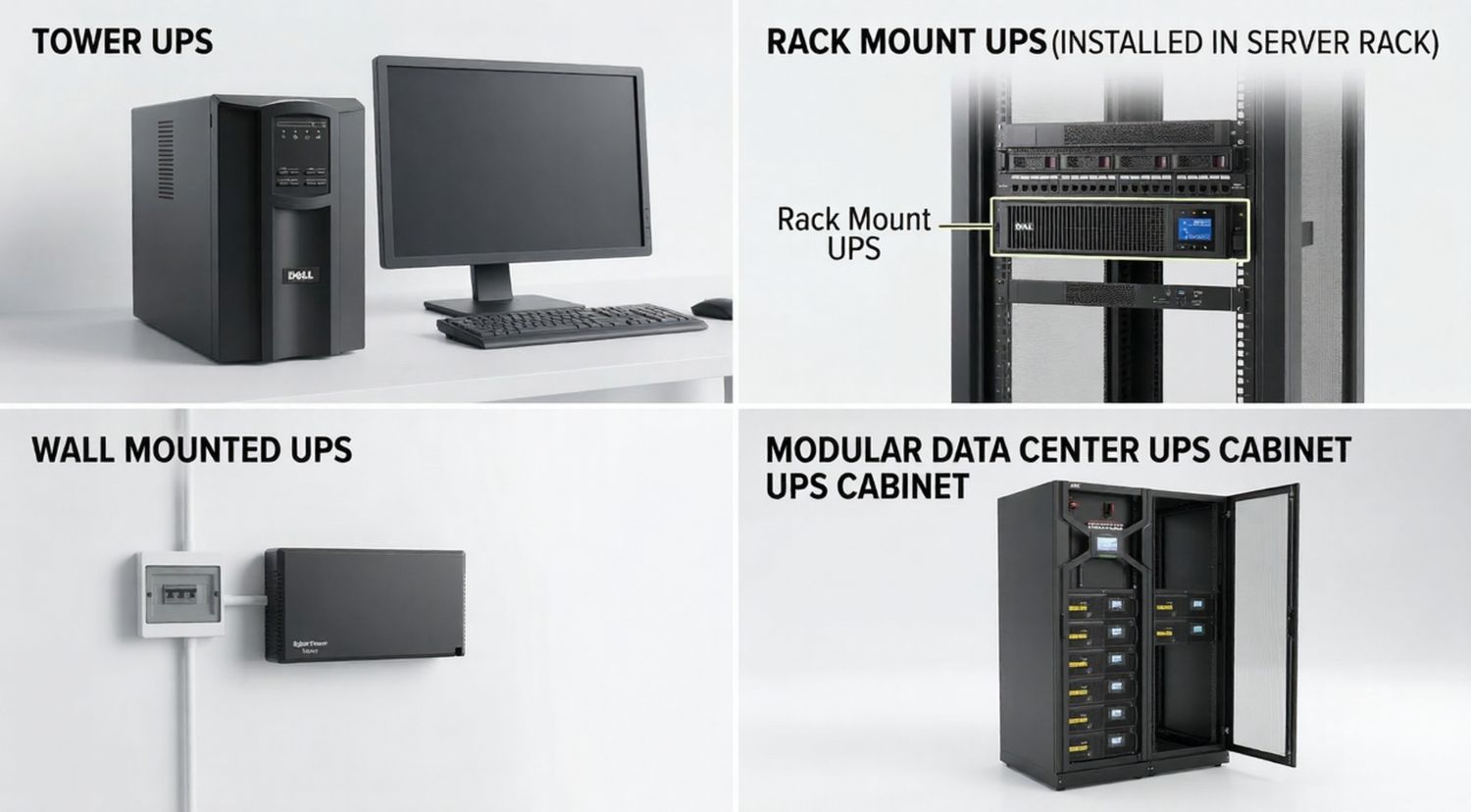
UPS systems are available in multiple physical configurations to accommodate installation constraints and infrastructure design. Form factor affects space utilization, cooling, serviceability, and scalability.
Tower UPS systems are freestanding units designed for offices, homes, and small server environments. Tower designs prioritize ease of installation, accessibility, and quiet operation.
Rack-mount UPS systems are installed in standard equipment racks. These systems optimize space utilization and integrate with servers, network devices, and data center infrastructure.
Wall-mount UPS systems conserve floor space and support network closets, retail locations, and industrial environments. These systems are designed for fixed installations and controlled access.
Modular UPS systems use scalable power and battery modules to support growing load requirements. Modular architecture improves redundancy, serviceability, and long-term capacity planning.
UPS connectivity and management features support monitoring, automation, and administrative control. These capabilities become increasingly important as UPS deployment scale increases.
USB and serial ports enable direct communication between the UPS and connected devices. These interfaces support status monitoring, automated shutdowns, and configuration management.
Network management cards provide Ethernet-based connectivity, allowing centralized monitoring across multiple UPS systems. These cards enable integration with network management platforms and data center infrastructure.
Remote monitoring systems provide real-time visibility into UPS status, battery health, and load conditions. Automated alerts notify administrators of power events and maintenance requirements.
Power management software coordinates shutdown sequences, event logging, and performance analysis. Software tools support compliance requirements and improve operational efficiency.
Advanced UPS features improve service continuity, maintenance efficiency, and fault tolerance. These features are typically required in enterprise, industrial, and mission-critical environments.
Hot-swappable batteries allow battery replacement without shutting down connected equipment. This feature reduces downtime and simplifies maintenance in critical environments.
An automatic internal bypass routes utility power directly to connected loads during UPS failure or overload conditions. This function preserves uptime during internal faults.
Manual maintenance bypass enables safe UPS servicing while maintaining power delivery. This feature is essential for enterprise and industrial installations.
Emergency Power Off (EPO) systems immediately disconnect power in emergency situations. EPO functionality is required in data centers, healthcare facilities, and regulated environments.
Battery-independent restart allows the UPS to power connected equipment when utility power returns, even if batteries are depleted or removed. This feature improves recovery time after extended outages.
Expandable UPS architectures support additional power modules and battery capacity. Scalability ensures long-term adaptability, redundancy, and cost-effective infrastructure growth.
UPS battery technology determines energy density, maintenance requirements, lifespan, and environmental tolerance. Different battery chemistries support different operational priorities.
Sealed lead-acid (SLA) batteries are the most widely used battery technology in UPS systems. SLA batteries are maintenance-free, valve-regulated, and designed for predictable discharge characteristics. These batteries provide stable performance, cost efficiency, and broad compatibility with UPS designs.
SLA batteries are commonly used in home, office, network, and data center UPS systems due to standardized sizing and established recycling infrastructure.
Lithium-ion UPS batteries offer higher energy density, longer lifespan, and reduced weight compared to SLA batteries. Lithium-ion batteries support faster charging, deeper discharge cycles, and improved thermal performance.
These batteries are increasingly used in data centers, edge computing environments, and space-constrained installations where longevity and reduced maintenance are critical.
UPS battery lifespan depends on battery chemistry, operating temperature, discharge frequency, and charging quality. SLA batteries typically last 3–5 years, while lithium-ion batteries may last 8–15 years under optimal conditions.
Replacement cycles should align with manufacturer specifications and operational risk tolerance to prevent unexpected failures.
Battery performance is highly sensitive to environmental conditions. Elevated temperatures accelerate battery aging, while low temperatures reduce available capacity. Most UPS batteries are rated for optimal operation at 20–25°C (68–77°F).
Proper environmental control extends battery lifespan and maintains predictable runtime performance.
UPS selection follows a structured decision process based on equipment requirements, power conditions, and operational objectives. A systematic approach reduces selection errors and overspending.
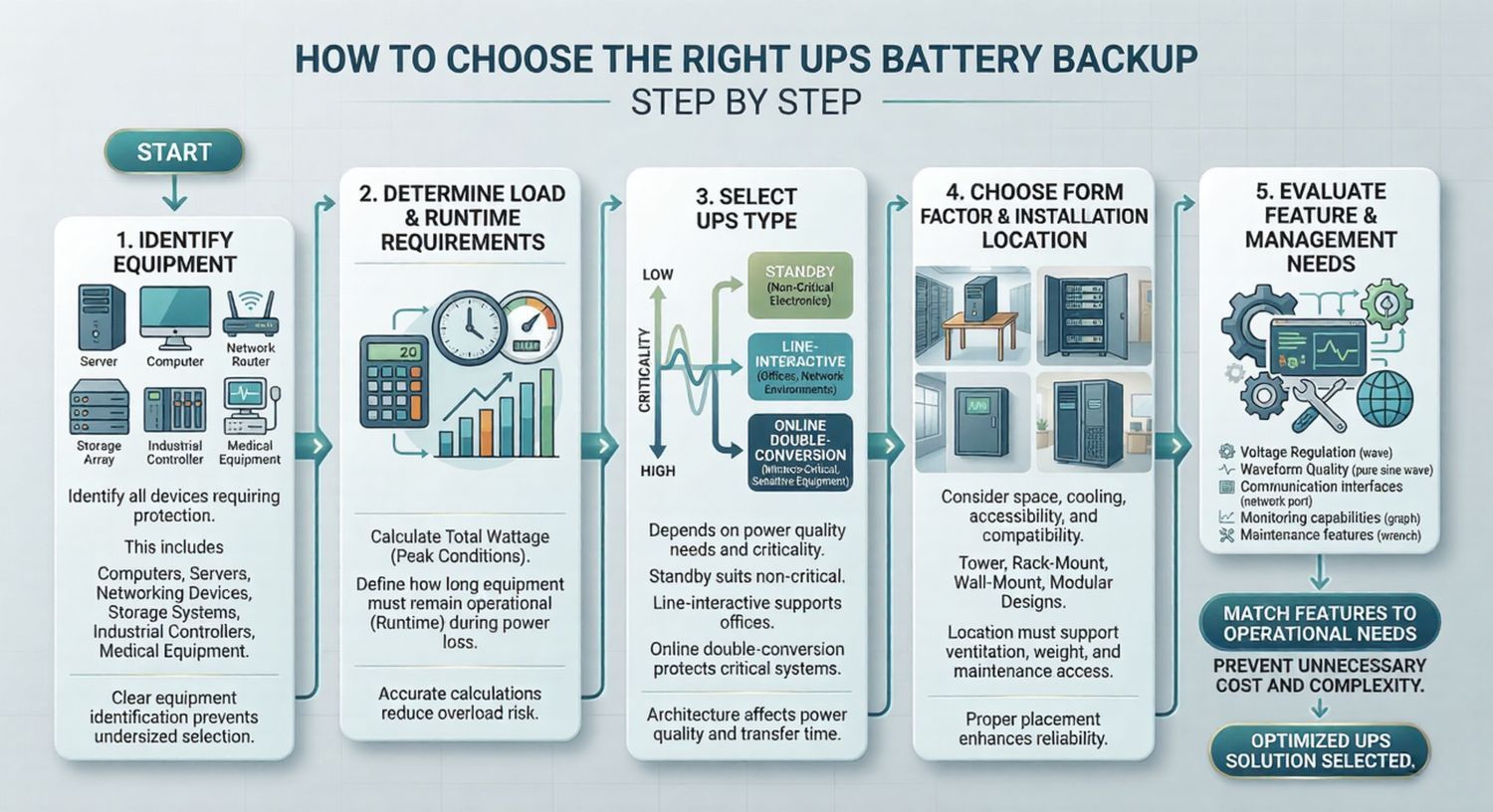
UPS selection begins with identifying all equipment requiring power protection. This includes computers, servers, networking devices, storage systems, industrial controllers, and medical equipment. Each device contributes to the total load and runtime requirements.
Clear equipment identification prevents undersized or oversized UPS selection.
Load determination involves calculating the total wattage of connected equipment under peak conditions. Runtime requirements define how long equipment must remain operational during power loss. These two factors establish minimum UPS capacity and battery sizing.
Accurate calculations reduce overload risk and ensure operational continuity.
UPS type selection depends on power quality requirements and criticality. Standby UPS systems suit non-critical electronics. Line-interactive UPS systems support offices and network environments. Online double-conversion UPS systems protect mission-critical and sensitive equipment.
UPS architecture directly affects power quality and transfer time.
Form factor selection considers physical space, cooling, accessibility, and infrastructure compatibility. Tower, rack-mount, wall-mount, and modular designs address different installation environments. Installation location must support ventilation, weight, and maintenance access.
Proper placement enhances reliability and serviceability.
Feature evaluation includes voltage regulation, waveform quality, communication interfaces, monitoring capabilities, and maintenance features. Management requirements vary based on scale, compliance obligations, and operational complexity.
Matching features to operational needs prevents unnecessary cost and complexity.
UPS battery replacement frequency depends on usage patterns, environmental conditions, and battery chemistry. Predictable replacement planning reduces failure risk. This section introduces battery aging behavior and replacement considerations.
Battery degradation manifests as reduced runtime, frequent alarms, extended recharge times, and physical swelling or leakage. Performance testing often reveals declining capacity before complete failure occurs.
Early detection reduces downtime risk.
Routine battery testing includes visual inspections, impedance measurements, and runtime testing under controlled conditions. Preventive maintenance schedules improve reliability and align with manufacturer recommendations.
Consistent testing supports predictable replacement planning.
UPS batteries contain regulated materials requiring proper disposal. Recycling programs recover lead, lithium, and other materials while preventing environmental contamination. Disposal must comply with local and international environmental regulations.
Responsible disposal supports sustainability and regulatory compliance.
UPS battery backup buying considerations integrate system architecture, capacity sizing, runtime planning, and long-term reliability. Effective selection balances immediate protection needs with future scalability.
Effective UPS selection aligns UPS architecture with application criticality. Standby, line-interactive, and online UPS systems serve distinct operational needs and power quality requirements.
Optimal UPS performance depends on balanced capacity sizing, sufficient runtime, and appropriate feature selection. Overemphasis on any single factor increases cost or operational risk.
Long-term reliability requires proper installation, environmental control, maintenance planning, and scalability considerations. UPS systems designed for future expansion support evolving infrastructure demands.
